Math
Float
Float Constant
A floating point constant.
Float Connector
The Float Connector node serves no purpose other than to extend Float connections in your node network for a simpler layout.
-x
Negate x
x*y
Multiply x and y
x+y
Add x and y
x-y
Subtract y from x
x/y
Divide x by y
abs(x)
Absolute value of x
pow(x,y)
x to the power of y
mod(x, m)
x modulo m
fract(x)
Return the fractal of x (the decimals)
x<y
1.0 if x is smaller than y, otherwise 0.0
max(x,y)
The larger of x and y
min(x,y)
The smaller of x and y
abs(x-y)
The distance between x and y (always a positive number)
sin(x)
Sinus of x
Integer
Integer Constant
An integer constant.
Integer Connector
The Integer Connector node serves no purpose other than to extend Integer connections in your node network for a simpler layout.
Int→Float
Converts the integer number x to a floating point number
Float→Int
Converts the floating-point number x to an integer by dropping the fractional part.
Clamp & Step
Clamp Range
The Clamp Range node calculates offset + x * factor, clamped by minValue and maxValue (if offset + x * factor is less than minValue, it will return minValue, and if it’s larger than maxValue, it will return maxValue).
Mod Range
The Mod Range node calculates: (offset + x * factor - minValue) modulo maxValue, and returns result + minValue. This keeps the value in the range minValue - (minValue + maxValue), by letting it wrap around.
Step
The Step node implements a binary threshold function that returns 0.0 or 1.0 based on a simple comparison. If x < edge, it will return 0.0; if x is larger than or equal to edge, it will return 1.0.
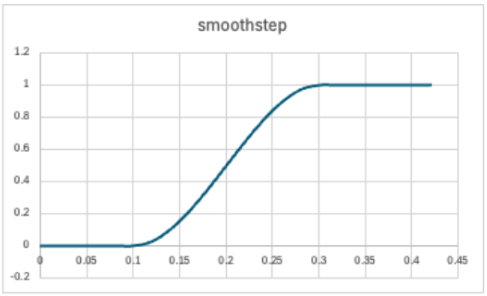
Smooth Step
The Smooth Step node calculates:
- 0.0 if x <= edge1
- 1.0 if x >= edge2
- a smooth transition between 0 and 1 when edge1 < x < edge2
It uses cubic Hermite interpolation to create a smooth S-curve between 0.0 and 1.0.
In the example below edge1 = 0.1, and edge2 = 0.3
Random
The Random node takes 1, 2, 3, or 4 seed inputs and returns a random number in the range [-1,1]. The result is not smooth, but random for all input values, however little they change. If you want smooth changes, use the simplex based noise functions UV Noise, 1D Noise, 2D Noise, or 3D Noise.
random(x)
Returns a random number in the range [-1,1]. For every x value, the result is independently random.
random(uv)
Returns a random number in the range [-1,1]. For every uv value, the result is independently random.
random(xyz)
Returns a random number in the range [-1,1]. For every xyz (position) value, the result is independently random.
random(xyz, t)
Returns a random number in the range [-1,1]. For every xyz (position) and t (time) value, the result is independently random.
Float Expressions
With Float Expressions you can express complicated math calculations in one node, rather than building them using simple individual nodes (which could make your node network complex). A Float Expression node take one or more float inputs, and returns one float output.
The Float Expression is executed by the GPU, so it must adhere to the OpenGL Shading Language (GLSL). The only difference is that for convenience, all integer values in your expressions will be turned into floating-point values by adding “.0” at the end, as this is required by GLSL for floating-point calculations.
f(x)→Float
This node takes one floating point value as input and outputs the floating point result of a calculation. Example: x*2+1
f(x,y)→Float
This node takes two floating point values as input and outputs the floating point result of a mathematical calculation. Example: x*y+y
f(x,y,z)→Float
This node takes three floating point values as input and outputs the floating point result of a mathematical calculation. Example: x+y+z/2
f(w,x,y,z)→Float
This node takes four floating point values as input and outputs the floating point result of a mathematical calculation. Example: mod(x+y+z/2,w)
f(v,w,x,y,z)→Float
This node takes five floating point values as input and outputs the floating point result of a mathematical calculation. Example: v*mod(x+y+z/2,w)
Int Expressions
f(x)→Int
This node takes one integer value as input and outputs the integer result of a calculation. Example: x*2+1
f(x,y)→Int
This node takes two integer values as input and outputs the integer result of a mathematical calculation. Example: x*y+y
f(x,y,z)→Int
This node takes three integer values as input and outputs the integer result of a mathematical calculation. Example: x+y+z/2
f(w,x,y,z)→Int
This node takes four integer values as input and outputs the integer result of a mathematical calculation. Example: mod(x+y+z/2,w)
f(v,w,x,y,z)→Int
This node takes five integer values as input and outputs the integer result of a mathematical calculation. Example: v*mod(x+y+z/2,w)