Animation
Make visuals move with the music
Build a dynamic, color-shifting 3D object that pulses and transforms in sync with any soundtrack. Learn to extract bass, treble, and mid frequencies and map them to visual properties like scale, color, and rotation.
Add an audio track and animate the scale of the image
- Add an Audio Track node (from the SOURCE DATA section),
- Double click the node and pick an existing audio track, e.g. in the audio folder, or upload a new personal track (mp3).
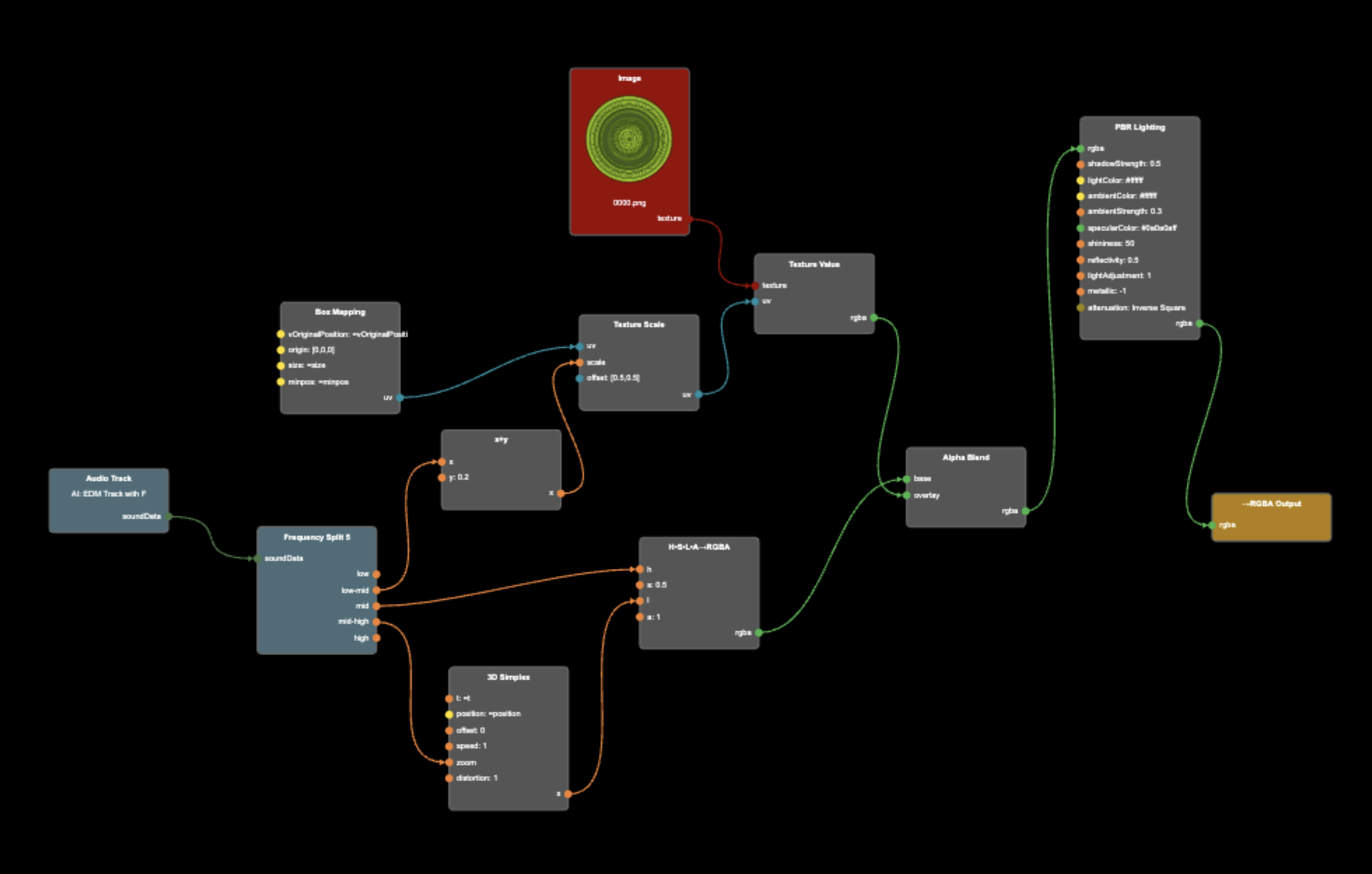
- Add a Frequency Split 5 node (from the SOURCE VALUES section), and connect the Audio Track to its sourceData input.
- Add a Texture Scale node (from the UV OPERATIONS section), and connect the low-mid output from the Frequency Split 5 node to the scale input of the Texture Scale node.
- Now insert this node in between the Box Mapping and Texture Value nodes by connecting the Box Mapping uv output, to the Texture Scale uv input, and the the Texture Scale uv output to the Texture Value uv input.
Note how the image disappears. This is because there is currently no sound, so the scale is zero. - To avoid that the image disappears completely, lets add a base level to the scale. Add a x+y node (from the MATH section). Connect the low-mid sound output, to the x input, and the x output to the scale input of the Texture Scale node.
- Now double click the x+y node, and enter 0.2 in the field for y.
Note how the image now appears (scaled down) in the middle of every side of the box. - Close the Shader Editor so you have an unobstructed view of the Scene Viewer.
- In the control bar at the bottom, click the loudspeaker icon to start playing your sound track.
Note how the sound affects the size of your image
Box with image that vibrates with sound track
(source)Create a colorful background with noise
- Add a H•S•L•A→RGBA node (from the HSLA section).
- Add a 3D Simplex noise node (from the ANIMATED VALUES section).
- Connect the 3D Simplex output to the h (hue) input of H•S•L•A→RGBA.
- Connect the rgba output from the H•S•L•A→RGBA node, to the base input of the Alpha Blend node.
Note how the hue now varies across all surfaces of the box
Box with image and colorful background
(source)Animate the background with sound
- Double click the 3D Simplex node, and change speed to 1.0.
Note how the background now is randomly animated
Animate both hue and lightness
- For a different background arrangement, we rearrange some connections.
- Connect the mid from Frequency Split 5 directly to h of H•S•L•A→RGBA.
- Connect the mid-high from Frequency Split 5 to zoom of 3D Simplex and connect the output to l (lightness) of H•S•L•A→RGBA.
Completed Project
Animated material
(source)Code